Overview Of This Week
This week, my aim was to ensure that the stretch goals from the week 3 fundamentals were completed before I could start to tackle the week 4 fundamentals in UE5.
Week 3 UE5 Fundamentals Stretch Goals
The Stretch goals that I completed this week were:
• A function that can manage multiple actors – such as a scale manager for all characters
• A function that moves actors to and from preset locations – such as a portal
A function that can manage multiple actors – such as a scale manager for all characters
I decided to implement the circular queue that I started making last week to allow for it to manage multiple portal actors. There will be multiple functions that will allow to add portals and pop portals out of the queue to clear space (there won’t be a peek function to peek through the queue). The function responsible for adding the portals into the queue will be shown below:
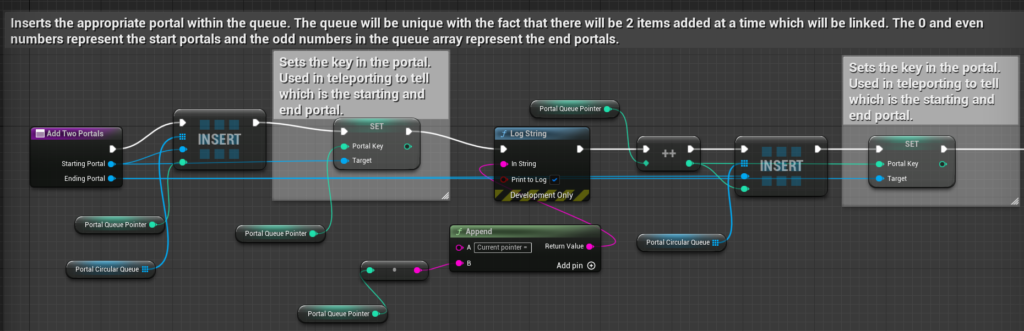
In this function, 2 arguments will be passed through: the starting portal and the ending portal. First, the starting portal will be indexed into the “portal circular queue” with the “portal queue pointer”. This same portal will then get its public integer variable by the name of “Portal Key”. This variable is very important as it will identify which is the start portal and which is the end portal when teleporting. A value that is 0 or even will be a start portal and the end portal will be marked as an odd number. After this, the portal queue pointer will then be incremented and the same process will be done for the ending portal. The process isn’t done however. The next step of this function will be shown below:

This final part of the function checks if the pointer to add the portals into the queue goes over the length of the array. The function “Queue Pointer Checker” and how it works will be shown below:
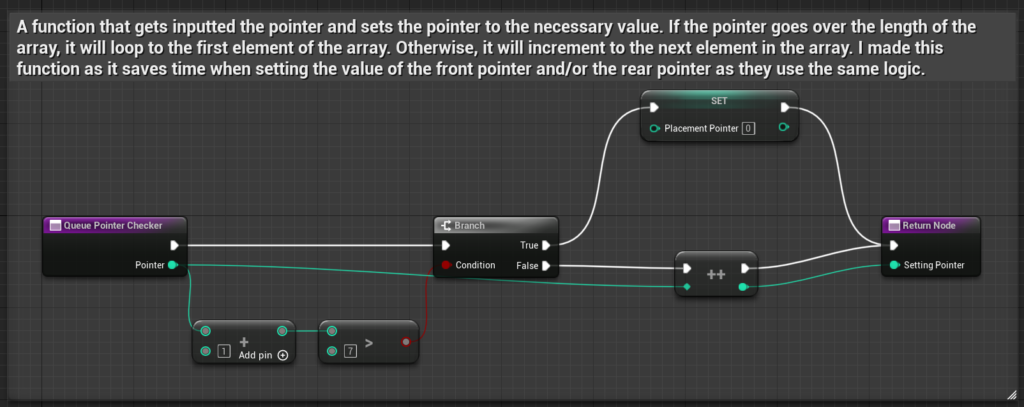
Another function that will be responsible for multiple actors will be the “Pop Portal Queue” function which removes the actors from the circular queue as well as deleting the actors from the world. The image will be shown below:

The way this works is similar to the adding of portals. The difference here is that the “Portal Queue Front Pointer” will be used and incremented. The actors within the index will then be destroyed. This function also has to check if the “Portal Queue Front Pointer” will go over the length of the array which an image to how this works will be shown below:

The last function which is responsible for multiple actors is the actual setting of portals. This function will be responsible to check if the circular queue is full to check if adding the portals is allowed. It is worth to note that the ” Add Two Portals” function is private so only the game manager can access this function. However, the popping of queues is public. The image of how this works will be shown below:

A question that a person may ask is why not just check if the “Portal Queue Pointer” reaches the length of the array. This will be wrong as, during runtime, the two pointers used will loop around the array to the start if there is available space present. Like the explanation in the image above, this is one of the ways to check if the portal circular queue will be full.
A function that moves actors to and from preset locations – such as a portal
With my functions for managing multiple actors being finished first, I was able to think how to teleport the player from two locations easier. My first step to overcome was thinking how to allow for the portals to only teleport once. This is where I came up with the idea to have a Boolean that will be set true or false under the right conditions. The next step was how to teleport the player from the correct portals. The first step for this process will be shown below:
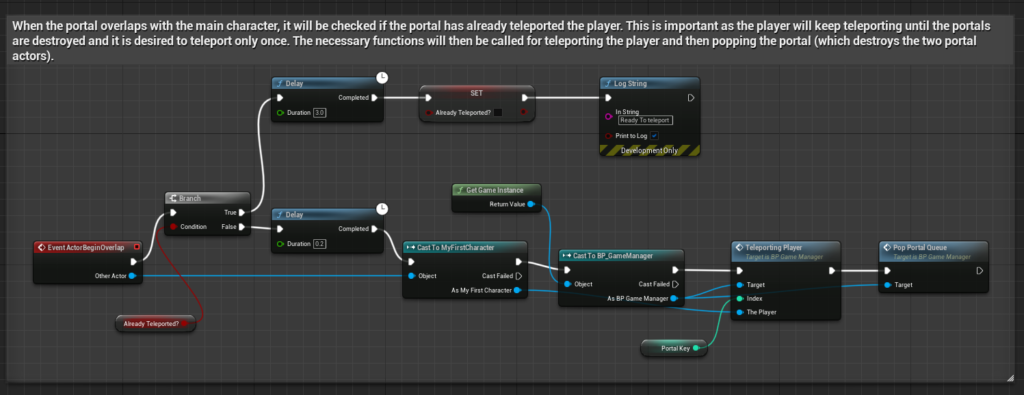
The second step to the process will be shown below:
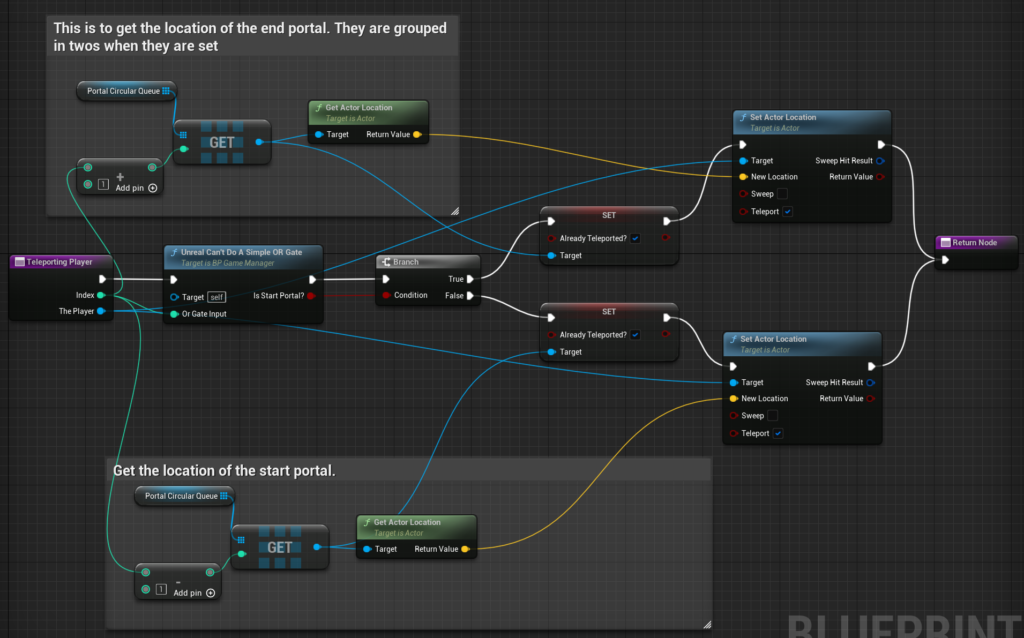
The code above looks quite complex but it is quite simple once you understand the process. Most of the left side of the image above checks if the portal inputted (with the special key that it has) is the start or end portal. If the portal is the start portal, it will get the location of the end portal and vice versa for the end portal. The Boolean, “already teleported?” will then be set to true in order to stop multiple teleports for the player. Finally, the location of the desired portal to teleport to will be set for the player. I did have a bit of trouble with the or gates in UE5 for this step which is why I made a function called “Unreal Can’t Do A Simple OR Gate”. This will be told more in depth in the “Extra Things I Have Learnt Or Problems I Have Solved This Week” section of this blog.
Extra Things I Have Learnt Or Problems I Have Solved This Week
- I had a problem whilst teleporting the player, particularly with the how UE5 handles the OR gates in blueprints. This is because, when I made an OR gate system to input the index key values of the portal, the OR gate would output an integer of 0 or 1 which would be desired to be as a Boolean value for my branch node. Another issue would be that the blueprints would become bloated with if statements checking if the portal key is even or not. The image of the problem will be shown below:
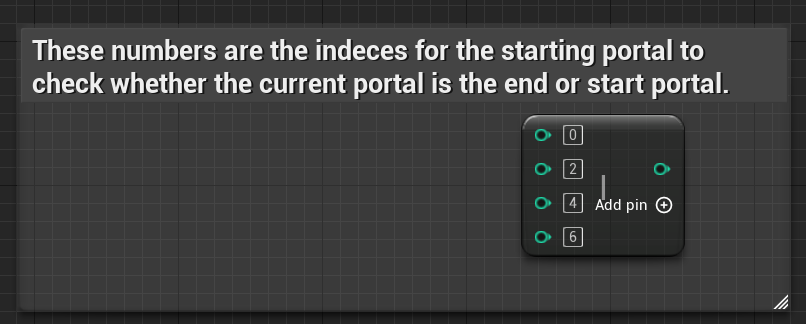
This is where I made my custom function “Unreal Can’t Do A Simple OR Gate”. I first made a working custom switch for the integer value of the portal key which will be shown below:

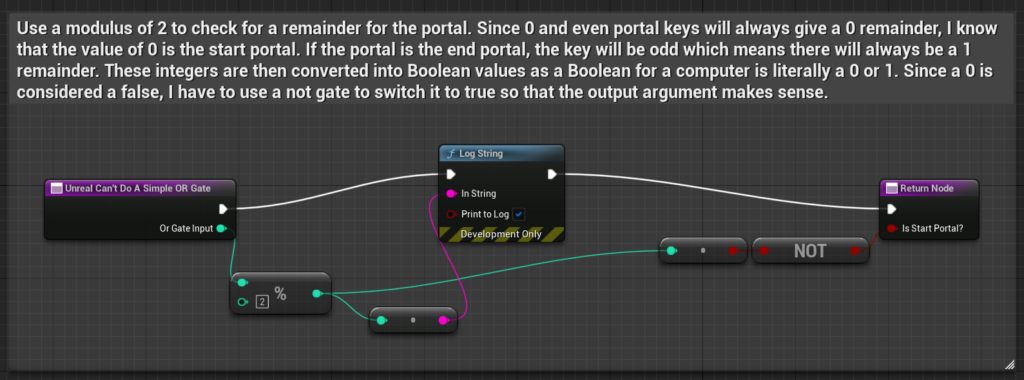
This is where I realised that there was a better way of finding if the key was for the start or the end portal. However, this still works but is unoptimized as the computer will have to go through extra steps of going through a switch statement and then setting a local Boolean variable to then be outputted from the function. The more optimized version of the code uses a modulus which essentially checks for a remainder from two values. The explanation of how this works will be shown below with my comments:
Plans For Next Week
All of my goals for the week 3 fundamentals are now complete. My goal for next week is to start the week 4 fundamentals.