Overview Of This Week
This week I was introduced into more complex code for JavaScript as well as learning about the key things about animation such as easing, lerps and exponentials with the knowledge of the mathematical formulae associated with each. I also learnt the basics of how to create simple html code to be able to display my JavaScript onto a computer screen.
Animation
I learnt the basics to animation. At first, I learnt the difference between using time-based and frame-based animation. The difference between the two techniques is key for the development of possible future games. Finding the solution can increase optimization and create an equal gaming environment for each player; time-based animation is important because it will draw and re-draw an image at a constant interval and not rely on the user’s gaming system. Frame-based animation is, usually, easier to implement with the use of engines such as unity and unreal, which rely on the frame per second, to draw and redraw objects/images. However, frame changes on game engines usually rely on the system’s hardware which can result in inconsistent animation.
I also learnt the importance of lerps (also called linear interpolation) which is a function to be used to move an image/object from point a to point b in a specific amount of time. With this information, I was also introduced to easing functions for animated objects. Easing functions are how fast a value changes between each animated slide until the end of the animation. The easing function can linearly increase the speed of the object or can be exponentially increased until reaching the end goal.
I also tried to represent the different easing functions on graphs as well as the representative mathematic formula. The mathematic formula for a linear easing out function would be represented as: “y = x”. The appropriate graph will be shown below:

Another easing function I tried to implement was a exponential easing out function. This function would be more representative of how a real life thing would move and could be implemented into many game objects such as a car, person or rocket accelerating. The mathematic formula could be represented as: “y = x2“. The appropriate graph will be shown below:

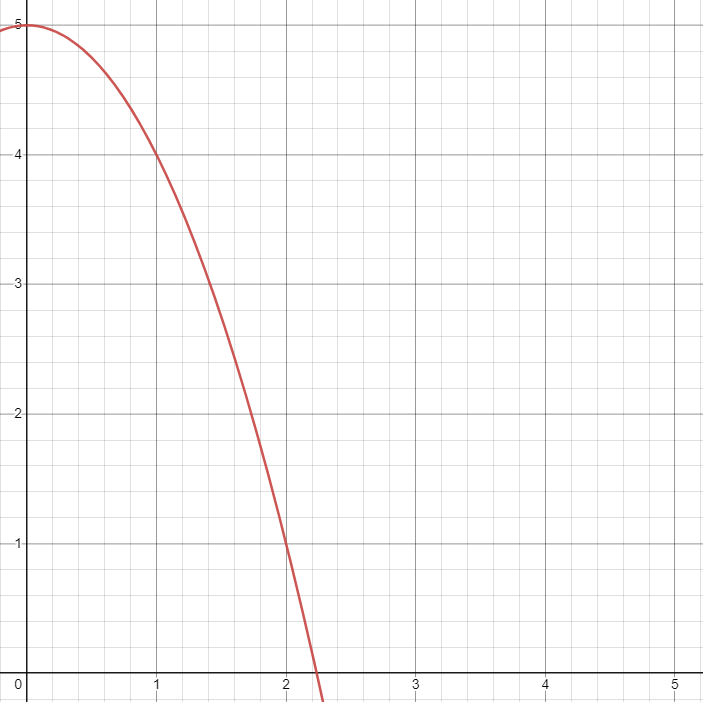
An easing function similar to the one above is an exponential easing in function. This function is the opposite of the easing above. This easing in function would be used for decelerating real life things and could be made into similar game objects with the opposite desired effects. The mathematic formula could be represented as: ” y = -x2 + 5″. The appropriate graph will be shown below:
extra challenges or important things from last week I have learnt
Last week, I wanted to learn the more complex aspects of JavaScript, precisely, with arrays as well as get to grips with the basics of html.
What I learnt With javaScript
I learnt how to implement arrays in JavaScript this week. However, further research showed me that arrays are not static but, by default, dynamic. This means that the size of the array can change at run time. This was weird for me, at first, as arrays in C++, C# and Java are static and have a list equivalent if the coder wants to have the dynamic option. Arrays are made like this:
let arrayTest = [1,2,3,4,5];
Since arrays are dynamic, this means that the size of it can change at run time. This is where the methods called “push()” and “pop()” can be used. “push()” adds an element to the end of the array and, an element that is wished to be added, will be inputted into the brackets. “pop()” removes an element from the end of the array. It is interesting to see that the standard library in JavaScript treats arrays as an abstract data structure called a “stack” where these commands are mostly used for. A “stack” is an abstract data structure which is also called a “first in last out” (FILO) due to the fact that the items that you add in first will be taken out last; it is easier to be pictured as having a pile of plates and “pushing” each new washed plate into the plate pile and then “popping” the plate that is currently at the top. How to use the methods will be shown below:
arrayTest.push(6);
arrayTest.pop();
Html practice
As well as learning more complex topics with JavaScript, I learnt the absolute basics with HTML to allow seamless coding with JavaScript. My aim was to be able to implement a JavaScript file as well as create a functioning html script without assistance. The example of how to create a html document will be shown below:
<!DOCTYPE html>
<html>
<head>
</head>
<body>
<script src = "testClass.js"></script>
</body>
</html>
The code above starts with <!DOCTYPE html> to allow the browser to know what document type it will be using which, in this case, will be html. Next, <html> and </html> is the actual html code that everything will be written in. The <head> part of the code is used for the metadata of the html document; this is essentially information that isn’t directly shown to the user when on the webpage. The <body> is used for the main contents for the code such as putting the JavaScript file inside. The <script src = “testClass.js”></script> gets the location of the JavaScript file which is named in quotation marks and will run the code within it.
Extra things I have learnt or problems I have solved this week
Html
- I have been coding in Visual Studio Code for html. Through repeated practice, I found out that a single “!” can open up the built-in tool called Intellisense which can automatically write the whole of the html document. this is useful as this can save time in future projects that I will make with JavaScript and html.
- From further research, I found out that multiple JavaScripts can be included in the html code. With this knowledge, this means that functions from other files can be shared and make code more readable rather than including it all in one file. The example of how this would be implemented below:
<body>
<script src = "otherClass.js"></script>
<script src = "testClass.js"></script>
</body>
The code above allows the coder that is using the “testClass” JavaScript file to access the functions inside the “otherClass” file.
JavaScript
- It was essential, this week, to learn how to implement arrays into my code as this was one of my aims from last week to increase my understanding of JavaScript.
- Further work also allowed me to produce 2 dimensional arrays which can further my possibilities with coding in JavaScript. An example of how to create a 2d dimensional array will be below:
let myArray = [
[1,2],
[3,4],
[5,6]
];
myArray[0][1] would return 1. This is because the left square bracket accesses the different arrays; the right square bracket accesses the elements inside those individual arrays.
extra challenges or important things i need to learn for next week
- I learnt how to use arrays effectively so far. My aim for next week is to familiarize myself with classes and how to instantiate them as this is the most important factor for creating complex programs in future projects.
- I would like to try implementing the easing functions into JavaScript when animating a simple 2d object