Overview Of This Week
This week I focussed on fully completing my enhanced input implementation in C++.
Unreal C++
Camera Movement
Camera movement was very similar to the implementation of normal character movement. A new input action had to be made in BP as well as in C++ as a variable. Since It is very similar to the movement script, I will only show the difference which is in the function called Look():

The difference here is that I am adding a pitch and yaw to the camera movement. Interestingly, The functions used for pitch and yaw are the ones that are used in BP so the translation wasn’t that hard to figure out.
Action Mappings
For this week, I decided to add an action mapping to jumping (space bar) and sprinting (left shift). There are more differences with making an action mapping compared to making the camera move. The first difference is that no changes have to be made for a new input action within BP as it is default to set to Boolean -> True if held down -> False if not held down. The non return type functions will be shown below:

The Jump action mapping is the easiest to understand. When it is called it will do the code below:

When it is called, bPressedJump will be set to true which allows the player to jump. This is the same as the jump function within BP.
The more complex piece of code is the code to make the player run:

This is more complex due to certain factors when running. To optimise the code, the input action within the input mapping context, in BP, Sets the the triggers like so:
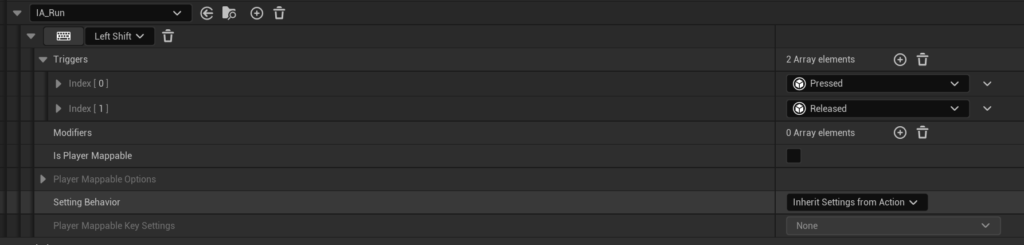
Here the Triggers are for when the key is pressed as well as when the key is released. This means that the event will fire off when pressed and then again when released. This means that the code in C++ will get a value of true first as it is held down which will result in the player movement speed going to the value of 2000 (I set it like this to see a noticeable difference when running). When the key is released the Boolean value held within the input action will be set to false which will result in the player going back to default speed.
Industry Practice
This week for Industry practice, it was shown how to make a desirable CV to show to potential employers in the future. I learnt key facts to keep in mind when I eventually write my own CV in the future. One amazing fact was that employers tend to look at the CV for so many seconds which means that you have to layout your CV in certain ways. The information that is most important will tend to be at the top and the lesser important facts will be lower on the page. Since I am going to be working in the games industry, I was hesitant on whether I should put my part time job for work experience. It turns out that there is nothing to be worried about as skills can be crossed over with having similar desired characteristics such as good communication and teamwork.
Extra Things I Have Learnt Or Problems I Have Solved This Week
- One of the problems that I experienced when trying to make the sprinting code, was that “GetCharacterMovement()->MaxWalkSpeed” was red underlined when implementing the code. Intellisense wrote an error that suggested that a necessary header had to be used in order for it to work. Through research, this is where I found that the header file, “GameFramework/CharacterMovementComponent.h” allows for it to work.
Plans For Next Week
Next week, I will continue with learning Unreal C++ and further improving my knowledge on the industry.