Overview Of This Week
After thinking and planning more on the Time loop game idea, I decided that it wasn’t good enough for the Hyper Casual theme. Thus, I researched some ideas and decided that I would translate my game that I made in a game jam, called Deep Dive Resort, from blueprints into C++.
Shameless plug if interested in playing the game:
https://someonecalleddanny.itch.io/deep-dive-resort
I made a simple plan for myself as I think that the game itself serves as a good basis for what I would like to make as well as knowing the process that I went through with my original planning for the game. My first step in translating was making a basic UI system. As well as doing C++, I learnt more about the games industry.
Trello Game Planning
The current Trello looks like this:
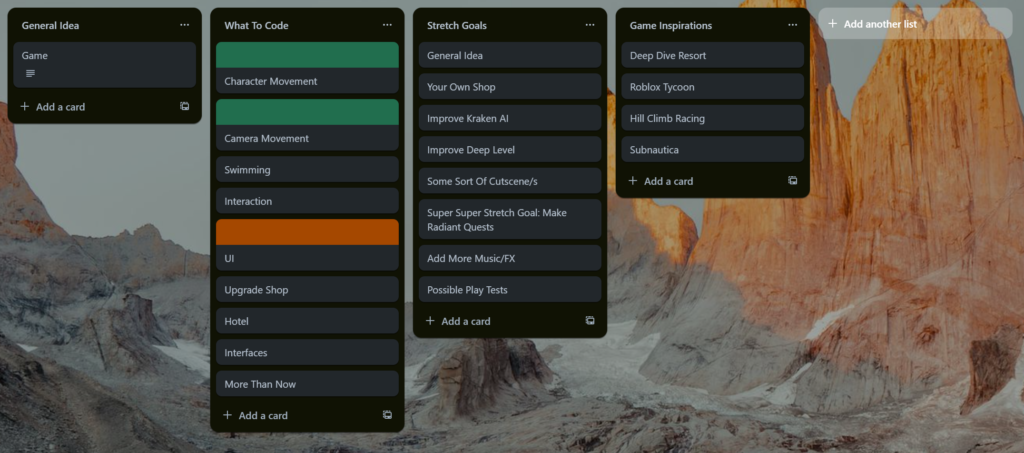
In the “What To Code” heading, I planned what I would like to do in the next few weeks. There is more to code into the game but this project will take more of a reductionist approach to make the process of translating the game more structured. So far, the movement capabilities are completed as that is what I have completed over these couple of weeks. My current task is to make UI. Since it is still in the process of being fully complete, it is marked in an orange colour. The idea so far is to make the upgrade shop functional before going to any other further steps; That is why the UI must be understood first. I also added Stretch goals to achieve. Most of them are things that I didn’t have time to implement in the game jam such as having your own shop. Some stretch goals are things that would make the user experience better as a whole such as more music. There are also game inspirations which is more of a mental check note for when the GDD gets developed. It isn’t constructed yet as the game is very early and scope is still being calculated before the desired final product can be advertised.
Unreal C++
UI
I wanted to make the UI for the shop. The final plan will be that the player will press “e” when next to the shop and it will open the shop UI. For now, I want to learn how to make the UI effectively so it will be activated whenever “e” is pressed. The code that I will be basing this off will be shown below:
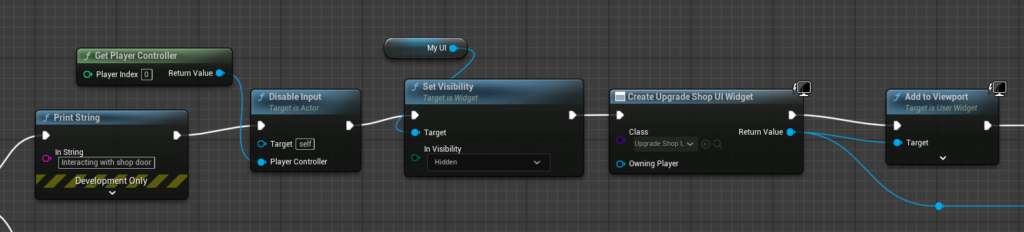
There are a number of ways to make a widget component in C++ but I decided to make it with UMG (Unreal Motion Graphics) compared to using Slate. In my opinion, it makes it easier to make UI as I want to make the things shown on screen such as progress bars etc to be made in the editor but interaction from them to be made in C++. Before anything can be done, I had to go into the build.cs file and add “UMG” so that the library could be accessed. Next, I had to make the class. The final class (header file) will be shown below:
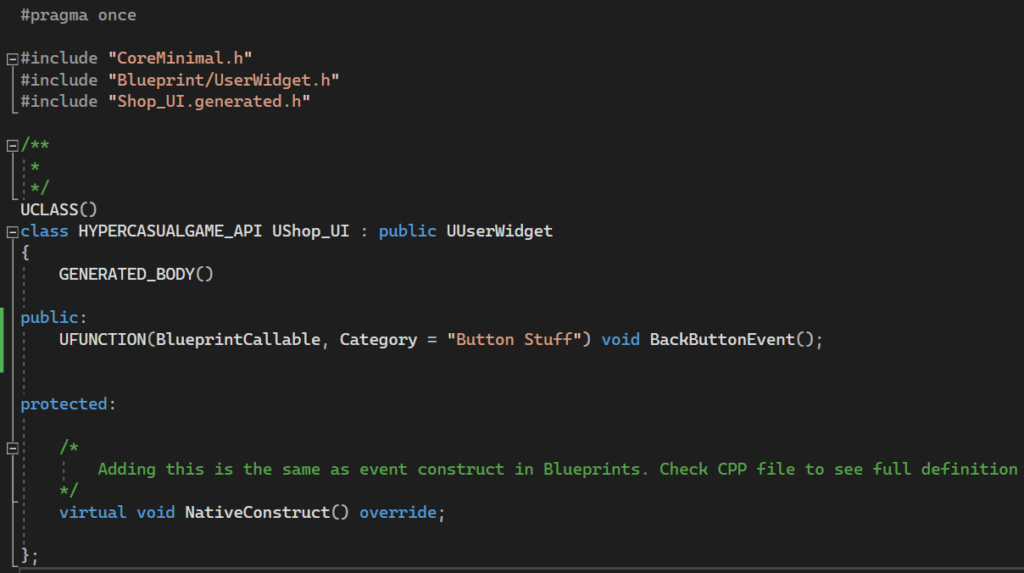
Since the owning actor will be the playable character, code will need to be added within the character C++ class:
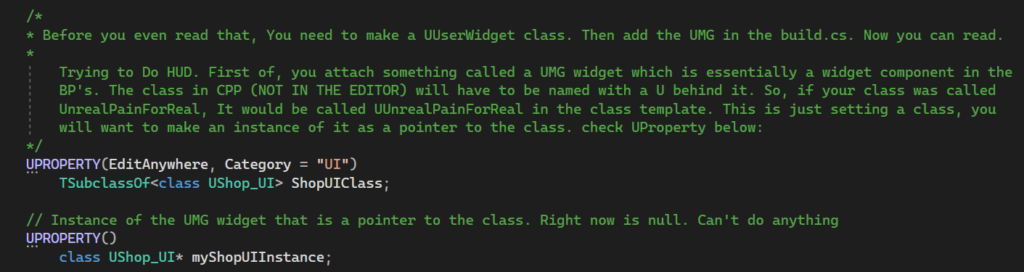
These UProperties, are essential to make the widget be shown on the character screen. These will be used when the character presses the “e” key which will be shown below:
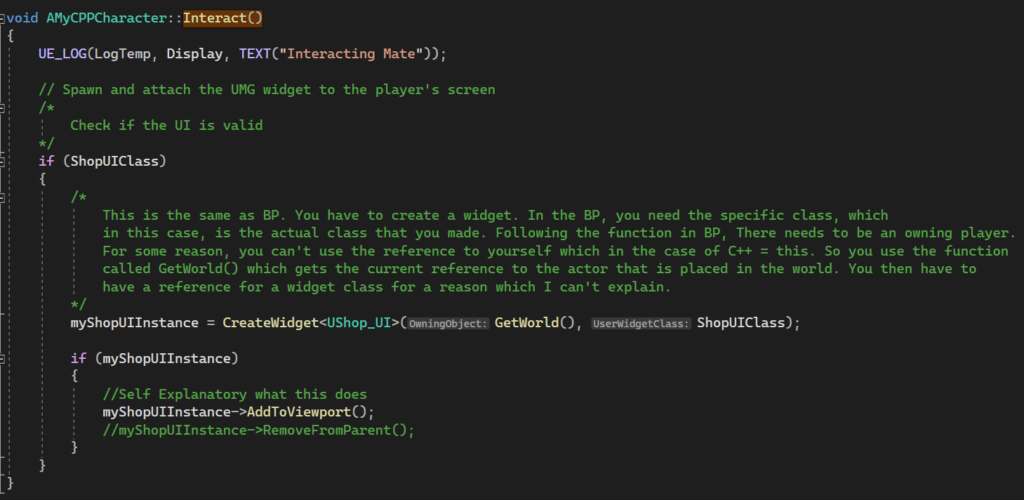
If confused why this happens when the player presses “e”, this function is called as it is bound to an input action. First, it checks if the class that is made within the header file is valid. If so, it will do the same logic as shown below:
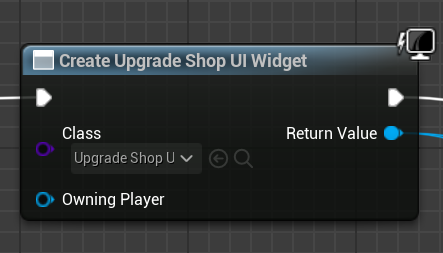
In the Create Widget function (following off the BP), it needs a widget class first. This is where you call the C++ class that you made (Remember to include the class as a header file in the CPP file). In the BP, it also needs an owning player. If you put it as null, the BP version of the function (I assume) automatically assigns it to the player character. However, (in C++) it wants a more direct approach. This is where you use the GetWorld() function which gets the current actor reference placed in the world which is essentially the “self” key word in BP. in the final argument, this is where you add the UProperty class to made it know that this is the UserWidget that you want to make. Finally, it is checked if the instance is valid. If so, add it to the viewport. This creates the Shop UI for the player. But, I wanted to do more. This is where I implemented this into C++:
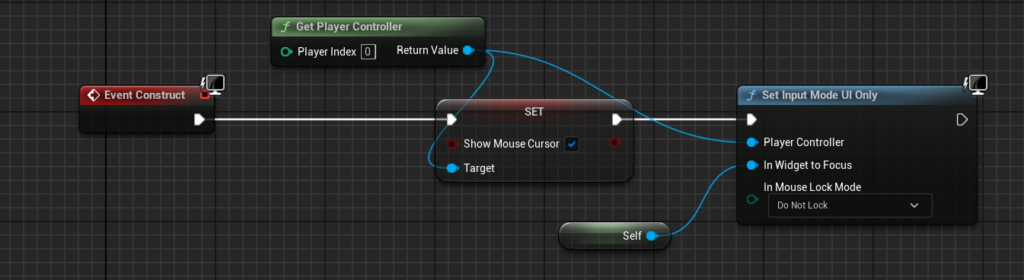
This code makes sure that the cursor is shown when the UI is constructed as well as not allowing any movement from the player by having the focus only to the UI. The same in C++ will be shown below:

When making this class in C++, it doesn’t come with the event construct like the BeginPlay is made for you when a character is made. This is where you have to use the NativeConstruct() keyword. The definition of it will be shown below:
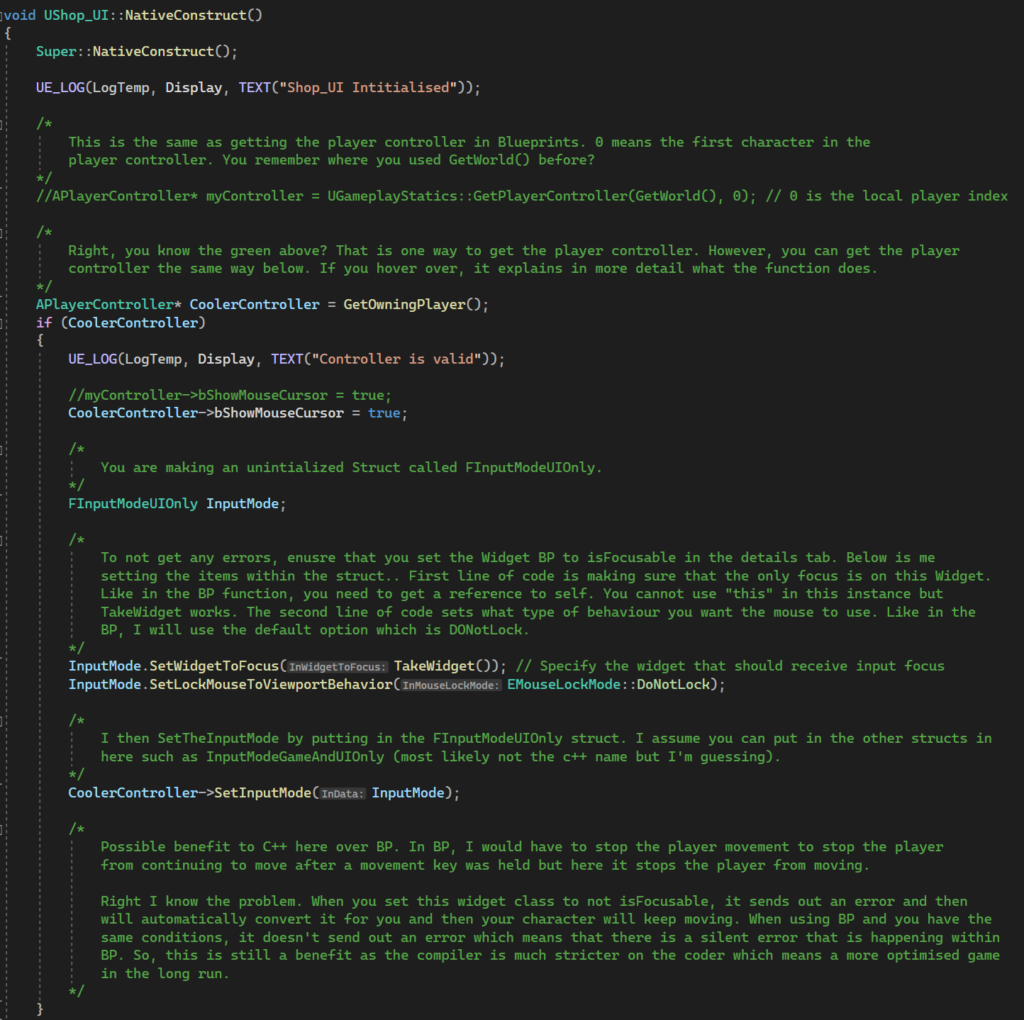
This is smaller than it looks. Most of this is code comments for when I want to make a user widget in the future. First the player controller needs to be initialised in order to access its functions. At first I tried to get the player controller through a reference from the world. However, I found that it was easier to get the player controller from the owner, which in this case, is the player character. It then checks if it is valid. The cursor is set to true to be shown. The more interesting difference is how to set the input mode compared to BP. In C++, you have to initialise the “InputModeUIOnly” struct. Then, the items within the struct need to be set. To make it easier to understand, the two things that are set within this struct are the same as:
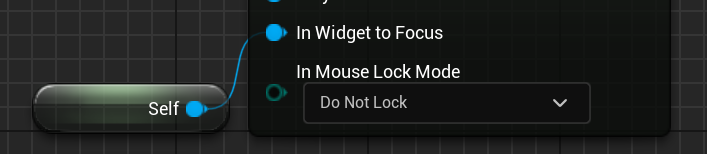
The widget in focus is self, which in this case, is what the “TakeWidget()” function does. I’m not entirely sure what the lock mode does but I wanted it to be similar to what the default is in BP. Finally the struct is put within the “SetInputMode()” function. After all this is done, the widget BP that is derived from the widget C++ class will have to be set in the character BP in the properties section.
Industry Practice
Whilst learning C++, I also took it upon myself to learn more of the games industry. I found that internships started to open up. This is where I found a useful website by the name of “https://ukie.org.uk”. After looking at the potential internships, I decided that the best ones to focus on would be an internship during the summer as taking a full placement year in industry would not work logistically as there are not many in Norwich. After looking at potential internships, I saw a trend of them needing a cover letter this is where I learnt how to structure and make a cover letter by Luke Oxford in a lecture. It was interesting for me to see how much research in a company you have to make before the cover letter is even made. I also learnt the crucial statistic that 70 percent of games jobs aren’t shown on jobs websites which made me want to make more connections within the industry.
Extra Things I Have Learnt Or Problems I Have Solved This Week
- Whilst implementing the UI, the next day of opening the project was met with crashes. The specific problem in the report was [File:D:\build\++UE5\Sync\Engine\Source\Runtime\CoreUObject\Private\Templates\Casts.cpp] [Line: 10] Cast of ShopUI /Script/HyperCasualGame.Default__ShopUI to SceneComponent failed. This made me confused as the editor wasn’t crashing the day I made the UI. To fix this I deleted the blueprint class that derived from the C++ class. It opened but the issue remained. Through iteration, this is where I used my knowledge from weeks prior with coding the enhanced input. Whenever the build.cs would be changed, certain files would have to be deleted and the entire project needing to be rebuilt. After doing this, it stopped crashing and started to work
- Whilst testing the UI, I found it annoying that I had to reset the whole solution. This is where I implemented a button within the BP that would call a function that was inside the C++ class. The function will be shown below:
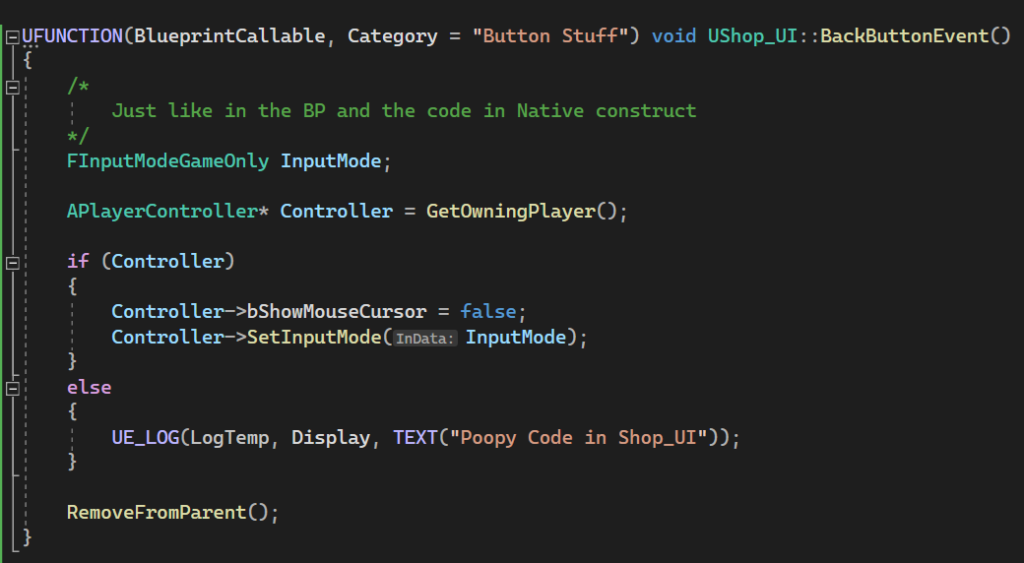
This code is the translation from this:
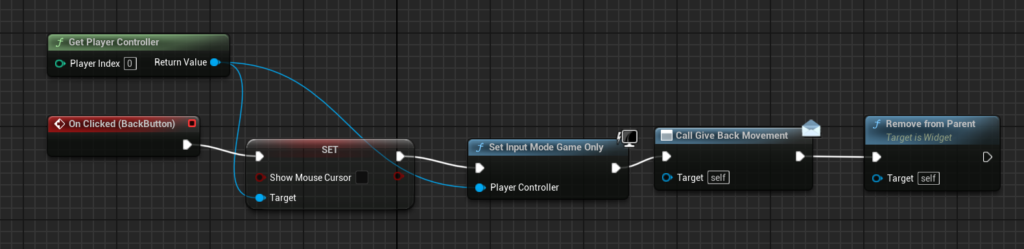
Interestingly, I used the same theory from when coding the event construct. A specific struct would have to be made which would be accessed through the player controller. If looking at the BP example, there’s an event listener. This would call for the player’s movement to be enabled as I had, for the longest time, a problem with the character movement that would make the character keep moving after a movement key was held down. When coding the same functionalities in C++, I was met with an error during runtime. This error complained about the widget not being focusable and then manually changing it. I never had this problem when coding in BPs. To fix this, I had to simply go in the properties tab and set the “IsFocusable” to true. This helped immensely because this meant that I have been coding wrong this whole time which means that, in future projects, I will implement this theory. This also meant that my code would be more optimised as there wouldn’t be any silent errors.
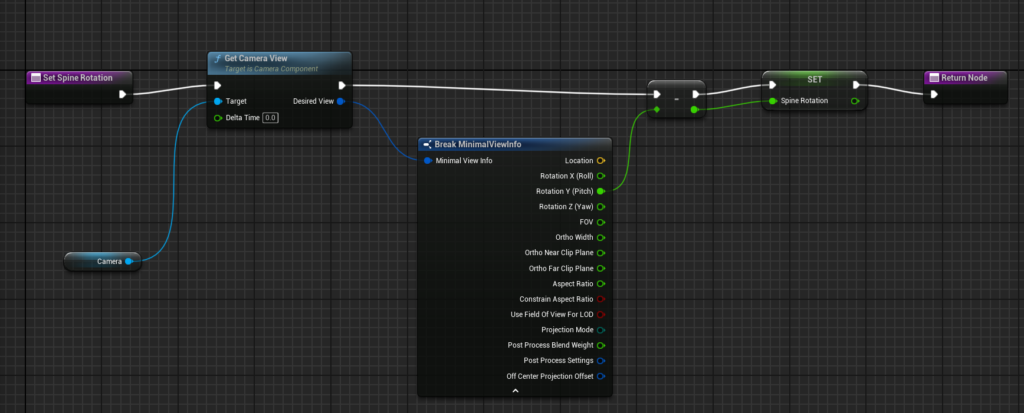
- I also implemented animation to my player with the use of blend spaces and more. However, I had a key thing that I learnt which was new to me. In BP’s I always implement this code for the spine to rotate so the body can move with the camera:
And to get the spine rotation in the animation blueprint, I would use a a getter function held within the character:
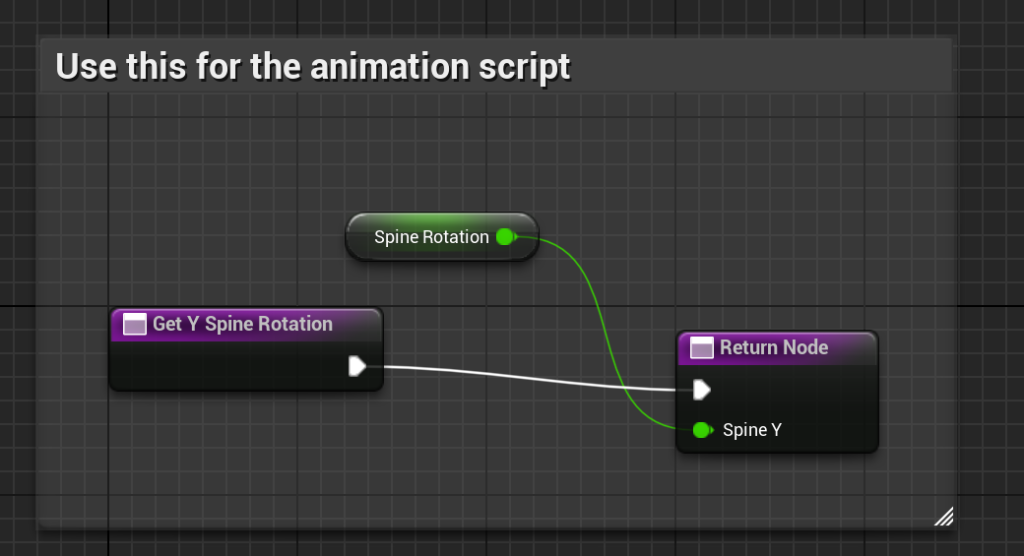
This would all be used in the animation blueprint to rotate the spine up and down for the player which will be shown below:
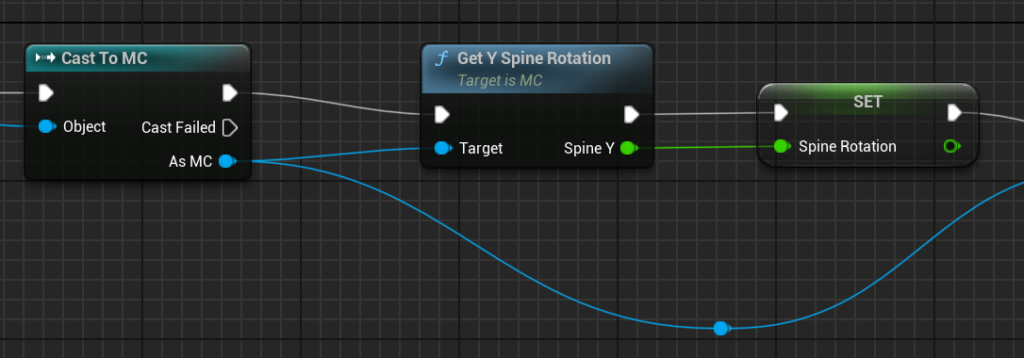
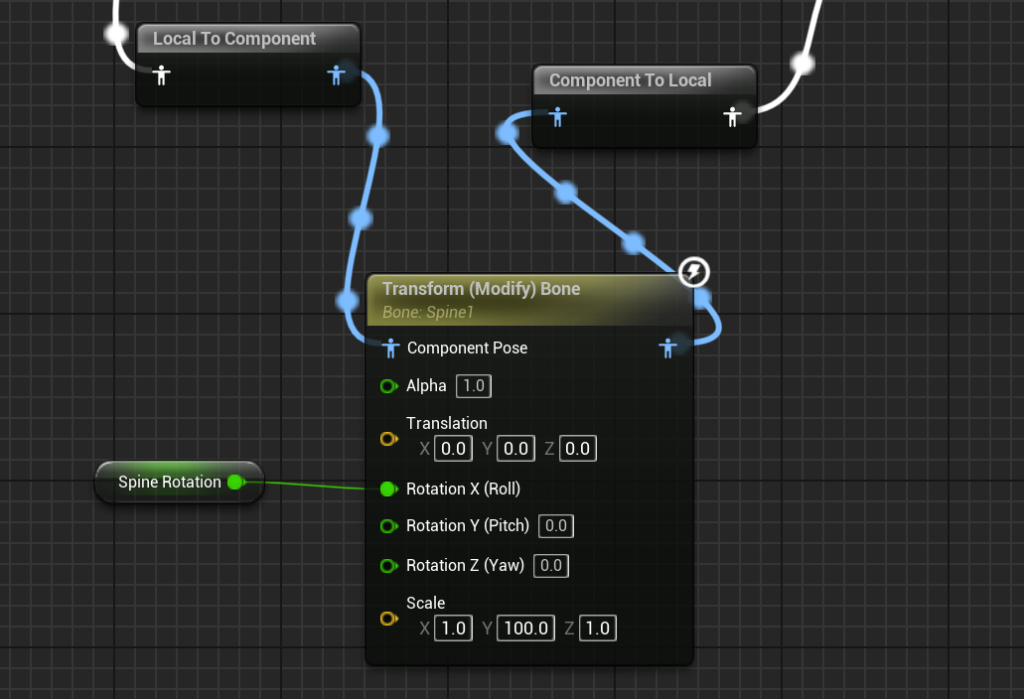
This function was translated into C++ within the character with added functionalities:

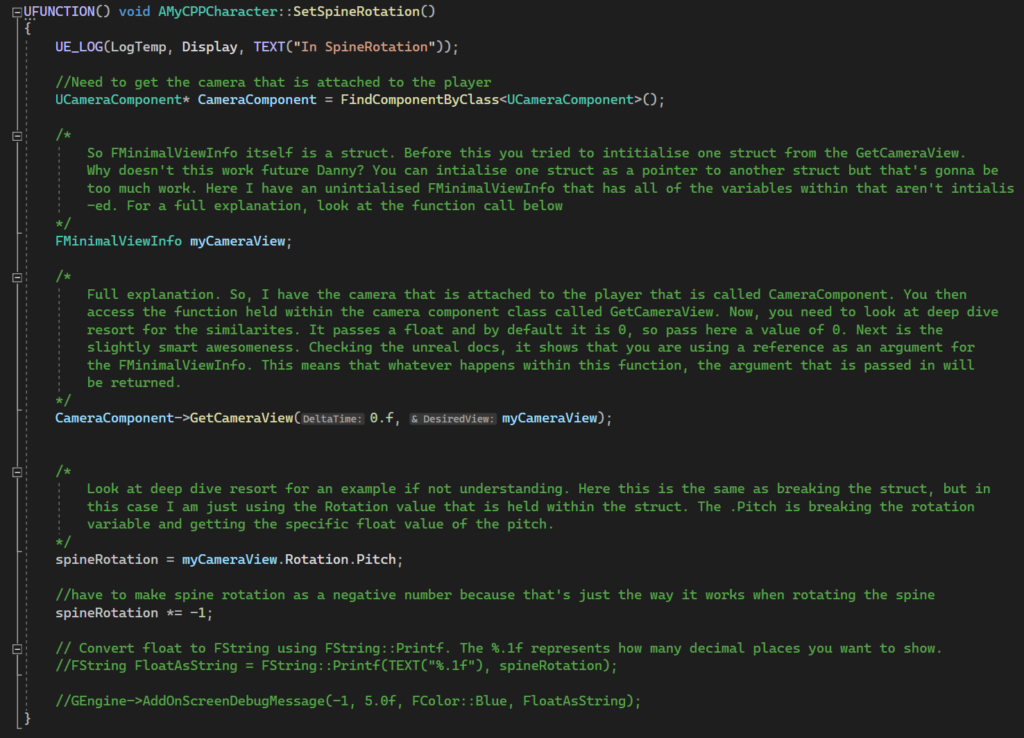

To explain “CPP file Setter”, I would get the pointer to the camera class that is attached to the player within the BP editor. I would then initialise the MinimalViewInfo struct. I would then set the struct with the GetCameraView function that is held within the camera component class.
Looking at the Unreal documentation, the function is a void type which means that it doesn’t return anything. How could it return a FMinimalView struct from the camera class? The answer is because it passes the struct as a reference. When you add a reference identifier to an argument in C++, anything that happens to that passed argument within the function will change it. This is what happens to my struct variable.
I then set my spineRotation variable (is a float) to the pitch. I then turn the value into a negative value as Unreal does up and down in an inverse relationship.
Whilst coding this function in C++, I saw the benefits of coding in C++ compared to BPs. The main benefit is that I can hide certain functions from view. I don’t want any other class to use the SetSpineRotation function. However, the BPs version can’t make it private as easily. In C++, I can simply not add any meta specifiers for the UFUNCTION.
Plans For Next Week
In my BP version of the game, I implemented interfaces for interaction between different classes. I would like to try to implement this into C++. As well as this, customise my UI for the shop. If I have more time in the week, I will follow my Trello for the next steps in making the game.