Overview Of This Week
This week was dedicated to catching up with all of my stretch goals from past weekly UE5 fundamentals. My first priority was overriding the inputs from the player and then completing the stretch goals for the week 3 fundamentals.
Something that overrides the controls from the player – such as a remote-controlled missile or a hot air balloon
This took me a long time to make, however, it is finally working. There will be a lot of problems that I overcame which will be explained in “Extra Things I Have Learnt Or Problems I Have Solved This Week” section.
This works by having the player press the “4” key to select the homing spell. Then it will need to be shot by clicking the left mouse button. The main character blueprint holds all of the child spells. The “Shooting” event is held within the parent, in which, all of the children inherit from. This will be shown below:


In the image above, the variables “Mc Fire Location” and “Mc Rotation” are very important for the spawn of the spell as it allows for the camera that is attached to the spell to be facing the right way as well as shooting in the right direction.
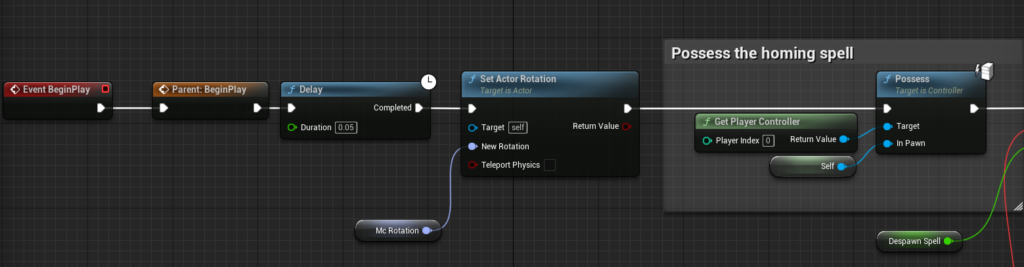
In the first part of the set of images within the child class of the spell blueprint, it shows what happens when the “homingspell” blueprint gets initialized. A delay is made to allow for the unreal engine to process all of the code. The set actor rotation allows for the spell to be the same rotation as the main character blueprint. The player controller is then possessed from the main character to the homing spell.
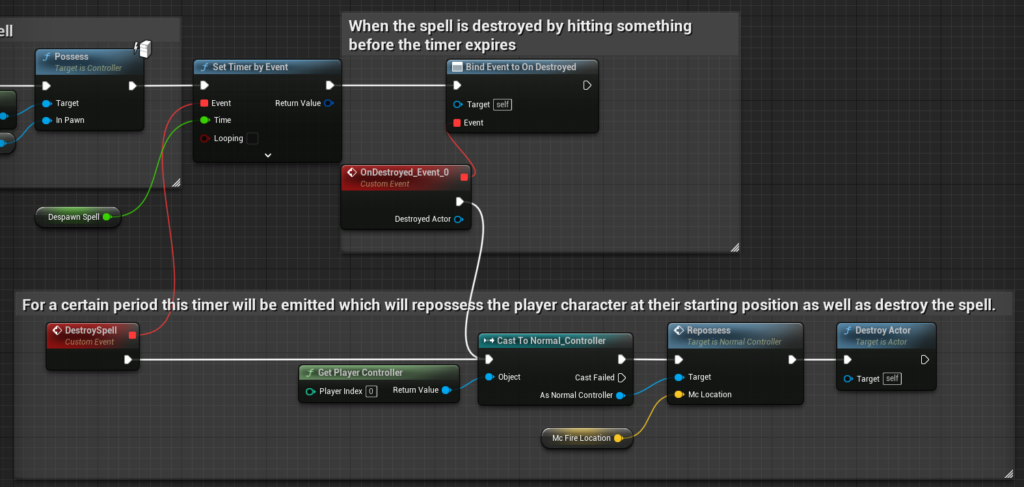
The next part in the child class shows how the control will be given back to the player. A set timer by event is made with the time before calling an event set to the duration of the “Despawn Spell” variable. After this set amount of time passes, the “DestroySpell” event is called which gets the player controller to be set back to the player. A function by the name of “Repossess” is called as well (explanation will come shortly). And, then the actor is destroyed. If the actor is destroyed before it is able to process the event timer, an event dispatcher will be called in order for the player to not be stuck in a sort of limbo.
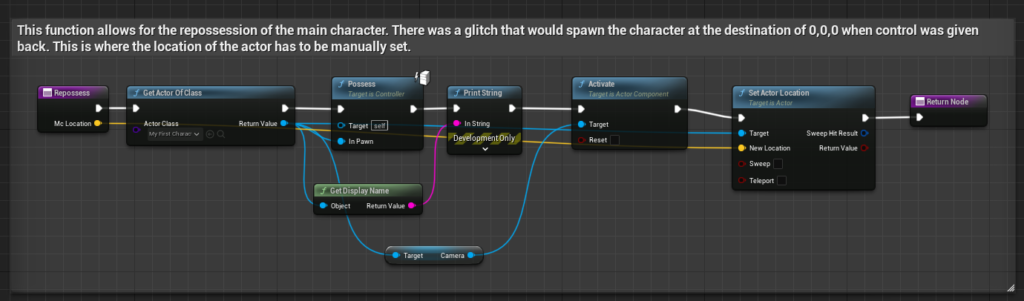
The last image is held within a player controller blueprint. This ensures that the controller is repossessed correctly onto the player.
Week 3 UE5 Fundamentals Stretch Goals
My stretch goals that I had to complete were:
• A function that can manage multiple actors – such as a scale manager for all characters
• A function that throws away actors that get near it – such as a bumper car
• A function that moves actors to and from preset locations – such as a portal
A function that throws away actors that get near it – such as a bumper car
For this criteria, I decided to make a booster bad for the player. Image shown below:

This script is held within the “PusherThing” blueprint. The script is relatively simple: when the player overlaps with the booster pad, it will launch the player relative to the direction that the arrow component (which is attached to the booster pad) with a set force.
Other Stretch Goals To Complete
For the function that manages multiple actors, I have started to make an abstract data structure called a circular queue that will be responsible for handling possible teleporters. A circular queue is similar to a normal queue with it being a first in first out structure (FIFO), with the only difference being that the queue will loop back to the start of the array if there isn’t any space left at the end but empty spaces at the front. Since implementing the possession of the homing spell took a long time to make and optimise, I am only at the first few steps in completing this goal.
Extra Things I Have Learnt Or Problems I Have Solved This Week
Most of the challenges this week that I had to face were from the criteria of: something that overrides the controls from the player – such as a remote-controlled missile or a hot air balloon.
I have iterated from these problems and have become more skilled with blueprints as a result.
Something that overrides the controls from the player – such as a remote-controlled missile or a hot air balloon
- The first problem that I tackled was setting the rotation of the spell. When it was first initialised, the ball would have the camera be upside down. This is where I found out that I could copy the main character’s rotation into a variable so this wouldn’t be an issue.
- The next problem was that if the player would hit the zombie that would mean that the spell would be destroyed. This means that the blueprint wouldn’t have the chance to repossess the player after a set delay and cause errors. This is where I used the “ondestroyed” event dispatcher which would bind an event when the actor would be destroyed and allow for the main character to be repossessed.
- Another glitch that would happen when repossessing to the player would be that they would teleport to the location of 0,0,0 for some reason. This is where I used the character’s location when firing the spell as a parameter to remember the location of the player. This location would then be manually set to teleport the player to when they would be repossessed eliminating this issue.
- Whilst testing the homing spell, I became a bit frustrated in waiting for the set delay to repossess the player as it would waste a bit of time. This is where I allowed for the player to press the space bar to allow for a quick repossession. The image for the blueprint will be shown below:
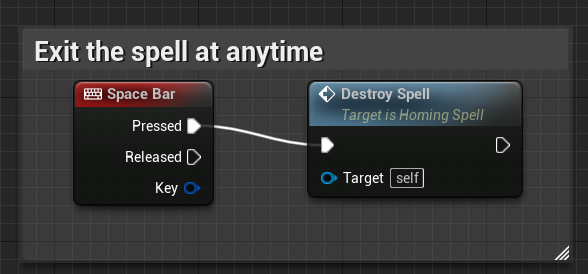
It is quite simple but it saved a lot of time when debugging as well as allowing the player to have an extra amount of fluidity in the gameplay. This calls the “Destroy Spell” custom event which is already shown in images already in this week’s blog about the homing spell.
Plans For Next Week
My plans for next week are to complete the remaining stretch goals for the week 3 fundamentals and hopefully try to complete some of the criteria within the week 4 UE5 fundamentals.