Overview Of This Week
I continued with practicing my fundamentals from last week as well as being set new tasks to achieve for this week. The tasks to try to complete for this week were:
As a minimum, try and implement:
• Some functions that change the blueprint’s appearance when conditions are met – such as a timed colour change
• Some functions that are used as “setters” and “getters” for other blueprints
As stretch goals, try making:
• A function that can manage multiple actors – such as a scale manager for all characters
• A function that throws away actors that get near it – such as a bumper car
• A function that moves actors to and from preset locations – such as a portal
Week 3 UE5 Fundamentals
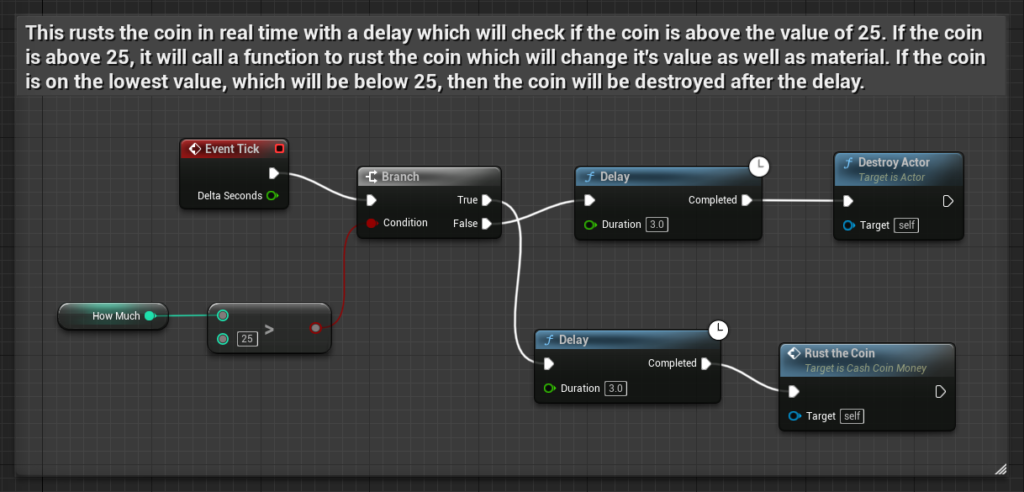
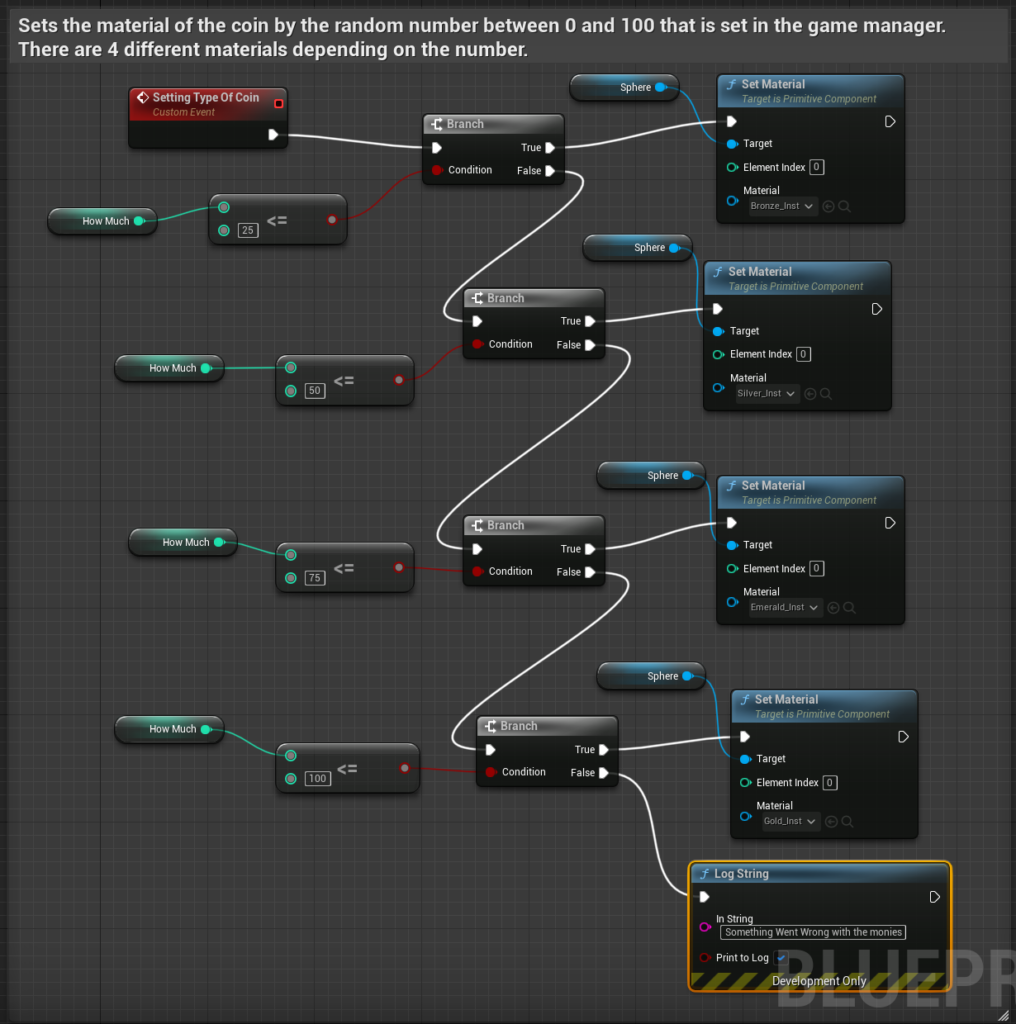
I achieved all of the minimum requirements for this week. However, I wasn’t able to complete the stretch goals of this week as I made it a priority to complete the stretch goals of last week. When the enemy zombie is killed, it will drop a coin as “loot” which will have the coin rust after a delay each time until it disappears. This meets the requirements of a timed colour change. The image of how it works will be shown below:

I even implemented setters and getters into my blueprints to ensure that there is an element of encapsulation which means that only relevant facts are shown publicly. One such example is setting the value of the coin from the game manager which is set in the setter function in the coin blueprint. The image of the setter will be shown below:

In this setter, it sets the private variable in the coin blueprint for the value that is inputted into this function. To ensure no possible confusion within the coin script, the input is clamped to not go over or under the specified thresholds.
I also used a getter in the game manager blueprint to receive the private variable of the value of the coin which is held within another blueprint. The image will be shown below:

Plans From Last Week Completed This Week
Last week I planned to complete the stretch goals for this week which were:
• Something that overrides the controls from the player – such as a remote-controlled missile or a hot air balloon
• Something that reads an actor’s properties to output different actions – such as a coin sorter
• Something that drops “loot” when it’s destroyed – such as an enemy or a chest
Something that drops “loot” when it’s destroyed – such as an enemy or a chest
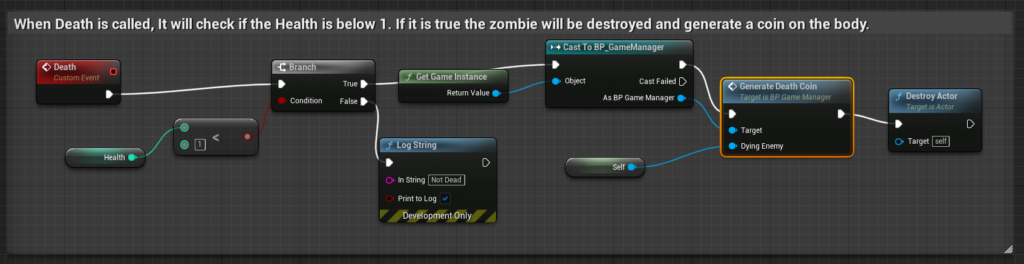
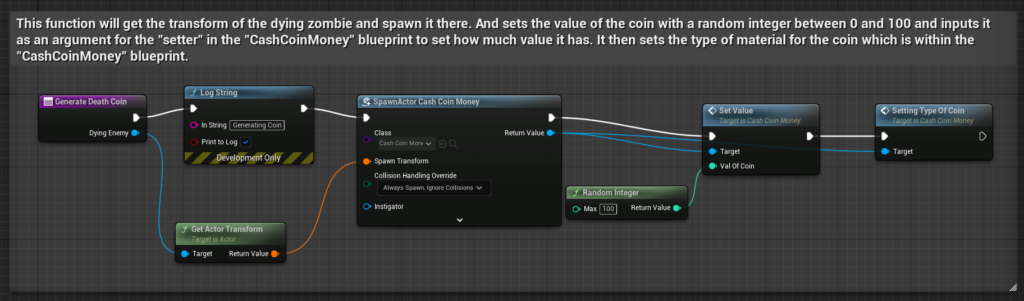
Working from last to first. I implemented the a coin to spawn on the enemy when when their health drops below a threshold and they experience death. Most of the logic of how it is made is shown above for the timed colour change for the minimum task for this week. The image of how it works will be shown below:
Something that reads an actor’s properties to output different actions – such as a coin sorter
For this, it’s already complete from me implementing a timed colour change.
This meets the criteria as the property from an actor can grammatically be the same actor as, if it wanted to be “another” actor, it would be specified. The actor’s property named “HowMuch” responds with different actions depending on the value. The actions are the type of material which will be set for the object when it is rusting or set a value from the game manager
Something that overrides the controls from the player – such as a remote-controlled missile or a hot air balloon
Unfortunately, this couldn’t be completed for this week as I experienced many problems trying to implement it.
Plans For Next Week
Before I can start my week 4 UE5 fundamentals tasks for next week, I have to catch up and try to complete the stretch goals from this week as well as fully completing the override in controls from the player.